




Easy4Live page loading indicator

Feature List

We are doing the best
4 You

Stream From Desktop

Super Easy to use with vMix, Wirecast, XSplit, OBS Studio and etc..

IG - Add Post

Schedule posts in your Feed, Story, IGTV and Carroussel.

RTMP Broadcasting

Simultaneous Live on Multiple Instagram accounts with only One Stream Key

Save to IGTV

Set your Live to automatically save to IGTV and get more followers.

Live Preview

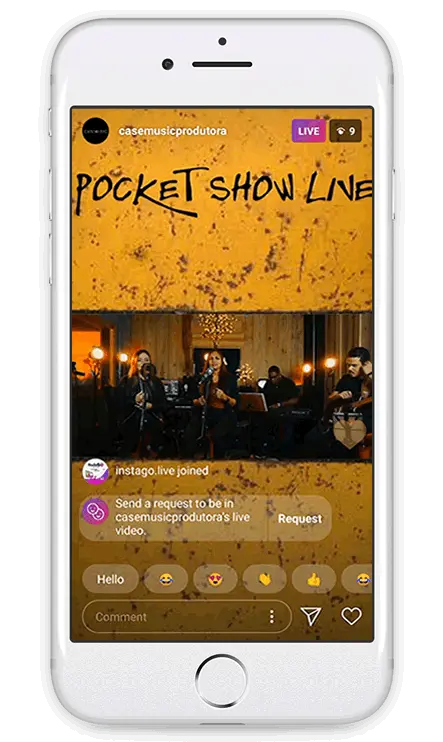
See everything that happens in your Live through our control panel.

Manage Comments

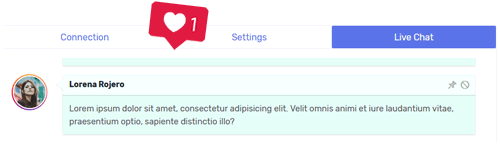
Panel to comment, Pin comments by you or your followers. Enable or disable comments.

Live History

All about your Lives! Likes, Comments and Who was in your Lives.

Statistics

Analytical report of your posts in your Feed.

Easy4Live feature section decoration Easy4Live feature section accent
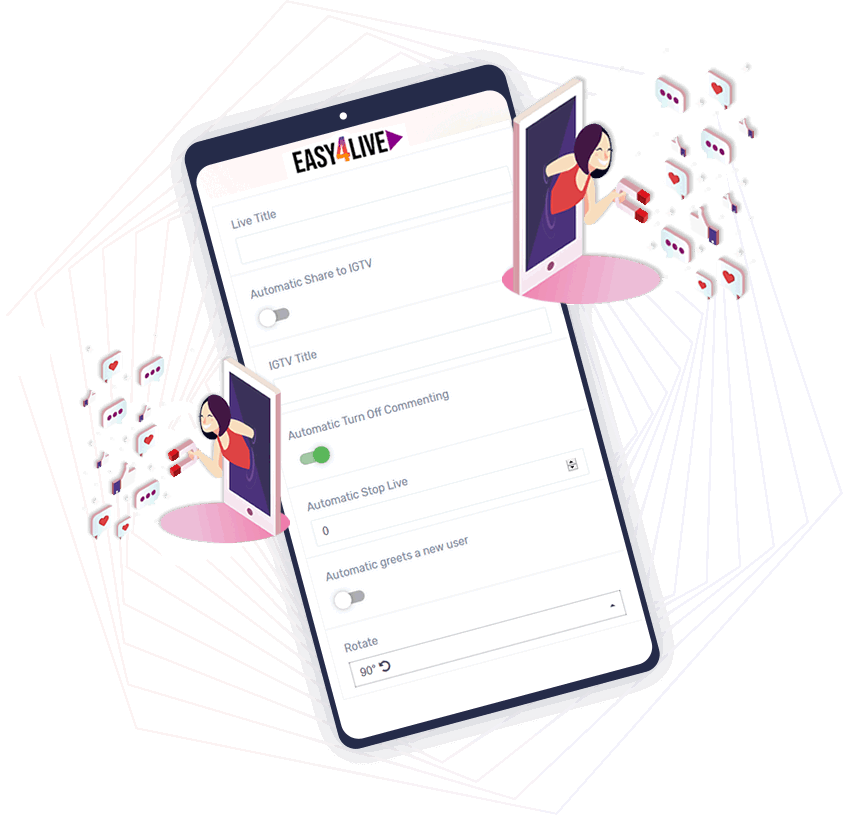
Easy4Live broadcast controls displayed on a mobile device

EASY4LIVE can Do

Powerful Application for
Your Lives

You can configure everything for your Live and so much more...

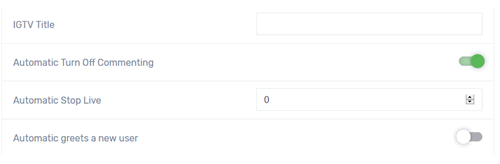
  • Enter your title and enable to automatically save to IGTV.
  • Send Greetings and Engage
  • Get your Audience Comments
  • Enable and Disable comments when you can
  • Pin your main comments
  • Rotate for your convenience
Yes, I want

686

Broadcasts

221

Comments

394

Viewers

32

Likes

WEB PANEL CONTROL

Everything you Need
Anywhere

Web
Acess

Nothing
to Install

Web Panel Control - So you have everything you need on any computer, on any operating system in just One Web Access.

Easy4Live account management screen Easy4Live web control panel preview Easy4Live browser-based streaming tools

MEMBERSHIP PLANS

Choose a pricing plan for
the required workflow

Beginner

$ 8.90

  • Instagram accounts (+1)
  • Simultaneous Lives ( 1 )
  • Post Types:
  • Photo, Video
  • Story (Photo only),
  • Album (Photo only)
  • IGTV (Video)
  • LIVE FEATURES:
  • RTMP Stream URL & KEY
  • Simultaneously Live stream
  • Real-time Live Preview
  • Host Comments panel
  • Enable/Disable Comments
  • Add/Pin Comments
  • Comment with Emojis 🥰
  • Automatic Greeting/Wave👋
  • Automatic Stop Live
  • Automatic Share to IGTV
  • Live Rotate +90º/-90º
  • Up to 240 minutes Live
  • History/Statistics
  • Cloud Import:
  • Not available
  • Spintax Support
  • Storage
  • 500.00 MB
  • Max. file size
  • 500.00 MB
Start monthly

Agency

$ 39.90

  • Instagram accounts (+10)
  • Simultaneous Lives ( 5 )
  • Post Types:
  • Photo, Video
  • Story (Mixed media),
  • Album (Mixed media)
  • IGTV (Video)
  • LIVE FEATURES:
  • RTMP Stream URL & KEY
  • Simultaneously Live stream
  • Real-time Live Preview
  • Host Comments panel
  • Enable/Disable Comments
  • Add/Pin Comments
  • Comment with Emojis 🥰
  • Automatic Greeting/Wave👋
  • Automatic Stop Live
  • Automatic Share to IGTV
  • Live Rotate +90º/-90º
  • Up to 240 minutes Live
  • History/Statistics
  • Cloud Import:
  • Spintax Support
  • Storage
  • 500.00 MB
  • Max. file size
  • 500.00 MB
Start monthly

Professional

$ 19.90

  • Instagram accounts (+20)
  • Simultaneous Lives ( 20 )
  • Post Types:
  • Photo, Video
  • Story (Mixed media),
  • Album (Mixed media)
  • IGTV (Video)
  • LIVE FEATURES:
  • RTMP Stream URL & KEY
  • Simultaneously Live stream
  • Real-time Live Preview
  • Host Comments panel
  • Enable/Disable Comments
  • Add/Pin Comments
  • Comment with Emojis 🥰
  • Automatic Greeting/Wave👋
  • Automatic Stop Live
  • Automatic Share to IGTV
  • Live Rotate +90º/-90º
  • Up to 240 minutes Live
  • History/Statistics
  • Cloud Import:
  • Spintax Support
  • Storage
  • 500.00 MB
  • Max. file size
  • 500.00 MB
Start monthly

test

$ 2.00

  • Zero accounts
  • Zero Simultaneous Lives
  • Post Types:
  • Photo, Video
  • Story (Mixed media),
  • Album (Mixed media)
  • IGTV (Video)
  • LIVE FEATURES:
  • RTMP Stream URL & KEY
  • Simultaneously Live stream
  • Real-time Live Preview
  • Host Comments panel
  • Enable/Disable Comments
  • Add/Pin Comments
  • Comment with Emojis 🥰
  • Automatic Greeting/Wave👋
  • Automatic Stop Live
  • Automatic Share to IGTV
  • Live Rotate +90º/-90º
  • Up to 240 minutes Live
  • History/Statistics
  • Cloud Import:
  • Spintax Support
  • Storage
  • 0.98 GB
  • Max. file size
  • 300.00 MB
Start monthly
One Day

ONE

$ 1.40

  • Instagram accounts (+1)
  • Simultaneous Lives ( 1 )
  • Post Types:
  • Photo, Video
  • Story (Mixed media),
  • Album (Mixed media)
  • IGTV (Video)
  • LIVE FEATURES:
  • RTMP Stream URL & KEY
  • Simultaneously Live stream
  • Real-time Live Preview
  • Host Comments panel
  • Enable/Disable Comments
  • Add/Pin Comments
  • Comment with Emojis 🥰
  • Automatic Greeting/Wave👋
  • Automatic Stop Live
  • Automatic Share to IGTV
  • Live Rotate +90º/-90º
  • Up to 240 minutes Live
  • History/Statistics
  • Cloud Import:
  • Spintax Support
  • Storage
  • 500.00 MB
  • Max. file size
  • 500.00 MB
Start monthly

Beginner

$ 87.00

  • You save $ 19.80
  • Instagram accounts (+1)
  • Simultaneous Lives ( 1 )
  • Post Types:
  • Photo, Video
  • Story (Photo only),
  • Album (Photo only)
  • IGTV (Video)
  • LIVE FEATURES:
  • RTMP Stream URL & KEY
  • Simultaneously Live stream
  • Real-time Live Preview
  • Host Comments panel
  • Enable/Disable Comments
  • Add/Pin Comments
  • Comment with Emojis 🥰
  • Automatic Greeting/Wave👋
  • Automatic Stop Live
  • Automatic Share to IGTV
  • Live Rotate +90º/-90º
  • Up to 240 minutes Live
  • History/Statistics
  • Cloud Import:
  • Not available
  • Spintax Support
  • Storage
  • 500.00 MB
Start annual

Agency

$ 103.96

  • You save $ 374.84
  • Instagram accounts (+10)
  • Simultaneous Lives ( 5 )
  • Post Types:
  • Photo, Video
  • Story (Photo+Video),
  • Album (Photo+Video)
  • IGTV (Video)
  • LIVE FEATURES:
  • RTMP Stream URL & KEY
  • Simultaneously Live stream
  • Real-time Live Preview
  • Host Comments panel
  • Enable/Disable Comments
  • Add/Pin Comments
  • Comment with Emojis 🥰
  • Automatic Greeting/Wave👋
  • Automatic Stop Live
  • Automatic Share to IGTV
  • Live Rotate +90º/-90º
  • Up to 240 minutes Live
  • History/Statistics
  • Cloud Import:
  • Spintax Support
  • Storage
  • 500.00 MB
Start annual

Professional

$ 197.00

  • You save $ 41.80
  • Instagram accounts (+20)
  • Simultaneous Lives ( 20 )
  • Post Types:
  • Photo, Video
  • Story (Photo+Video),
  • Album (Photo+Video)
  • IGTV (Video)
  • LIVE FEATURES:
  • RTMP Stream URL & KEY
  • Simultaneously Live stream
  • Real-time Live Preview
  • Host Comments panel
  • Enable/Disable Comments
  • Add/Pin Comments
  • Comment with Emojis 🥰
  • Automatic Greeting/Wave👋
  • Automatic Stop Live
  • Automatic Share to IGTV
  • Live Rotate +90º/-90º
  • Up to 240 minutes Live
  • History/Statistics
  • Cloud Import:
  • Spintax Support
  • Storage
  • 500.00 MB
Start annual

test

$ 20.00

  • You save $ 4.00
  • No Instagram accounts
  • Zero Simultaneous Lives
  • Post Types:
  • Photo, Video
  • Story (Photo+Video),
  • Album (Photo+Video)
  • IGTV (Video)
  • LIVE FEATURES:
  • RTMP Stream URL & KEY
  • Simultaneously Live stream
  • Real-time Live Preview
  • Host Comments panel
  • Enable/Disable Comments
  • Add/Pin Comments
  • Comment with Emojis 🥰
  • Automatic Greeting/Wave👋
  • Automatic Stop Live
  • Automatic Share to IGTV
  • Live Rotate +90º/-90º
  • Up to 240 minutes Live
  • History/Statistics
  • Cloud Import:
  • Spintax Support
  • Storage
  • 0.98 GB
Start annual
One Day

ONE

$ 1.40

  • You save $ 15.40
  • Instagram accounts (+1)
  • Simultaneous Lives ( 1 )
  • Post Types:
  • Photo, Video
  • Story (Photo+Video),
  • Album (Photo+Video)
  • IGTV (Video)
  • LIVE FEATURES:
  • RTMP Stream URL & KEY
  • Simultaneously Live stream
  • Real-time Live Preview
  • Host Comments panel
  • Enable/Disable Comments
  • Add/Pin Comments
  • Comment with Emojis 🥰
  • Automatic Greeting/Wave👋
  • Automatic Stop Live
  • Automatic Share to IGTV
  • Live Rotate +90º/-90º
  • Up to 240 minutes Live
  • History/Statistics
  • Cloud Import:
  • Spintax Support
  • Storage
  • 500.00 MB
Start annual
Easy4Live FAQ section decoration

FAQS

Frequently
Asked Questions

How to rotate a video?

- In the live rtmp module>>
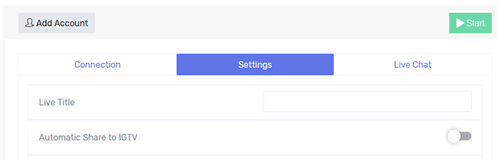
- Go to the settings tab
- And in the last rotation option
- Select the desired option >>
- 90 degrees clockwise or counterclockwise

You need to do this before you start the live stream

Can I stream on multiple accounts simultaneously?

Yes.

But, exist a workaround

With Livestream RTMP:

  • Generate for each of your accounts a stream key.
  • You can do this by just open a tab for each account, and in each tab, select the account and press on Connection
  • Also, if you use for example OBS Studio, you can install RTMP Multistream plugin for multi accounts.
  • They will use the same source.
  • Insert in each of them the stream key 
  • Now Start to go live on each account.

How can I stream more than 1 hour?

If your account is the authentic presence of the public figure, celebrity, or represents a global brand, you can request a verified badge from Instagram.

This will allow you to keep a live stream up to 4 hours continuously.

More details here: https://help.instagram.com/854227311295302

How do I get my stream key?

1 - Go to RTMP MODULE

2 - Go to the connections tab, here you can see
     RTMP Server URL >>

     Stream Key >>

I see the live on my panel, but on Instagram app itself on the home page the streaming is not showing

You can see your live from EASY4LIVE page and from the Instagram app from another IG account as a visitor.
EASY4LIVE act as a separate phone with the Instagram app installed, so the live stream itself you can see and control only from EASY4LIVE Panel.

Can I change to another subscription?

Yes.

  1. You can pay a full amount for the other subscription, you will be upgraded and you will be extended for new 30 days + additionals days depending on the previous subscription 
  2. You can upgrade and keep your period, just by paying the difference. For this contact us via email or chat and we will help you with this.

Is this a subscription based service or one time payment?

Both.

When you pay for the subscription, you can select a one-time payment or a monthly recurring payment.

You can cancel your monthly recurring payment on your profile page.

Can I pay with Credit Card?

Yes, you can.
On the payment page, just select the Credit Card method.

We accept payments from the whole world, except USA, Canada; Brazil, Argentina, Colombia; Japan; United Kingdom.


Here is the full list of the accepted countries:

Russia, Ukraine, Kazakhstan, Belarus, Armenia, Azerbaijan, Estonia, Georgia, Kyrgyzstan, Tajikistan, Lithuania, Latvia, Moldova, Turkmenistan, Uzbekistan.

Albania, Austria, Belgium, Bulgaria, Switzerland, Czech Republic, Germany, Spain, Finland, Greece, Croatia, Hungary, Ireland, Italy, Luxembourg, Montenegro, Netherlands, Norway, Poland, Portugal, Serbia, Sweden, Slovenia, Slovakia, Andorra, Denmark, Iceland, Liechtenstein, Malta, Monaco, Romania, France.

China, Indonesia, Israel, India, Cambodia, Malaysia, Vietnam, Thailand, Bangladesh, Bahrain, Brunei Darussalam, Bhutan, Jordan, Qatar, Cyprus, Korea, Kuwait, Laos, Lebanon, Maldives, Mongolia, Myanmar, Nepal, United Arab Emirates, Oman, Saudi Arabia, Singapore, Taiwan (China), Timor-Leste, Turkey, Philippines, Sri Lanka.

Abkhazia, Australia, Bosnia and Herzegovina, Bolivia, Chile, Ecuador, Egypt, Hong Kong, Kenya, Kosovo, Morocco, Macedonia, Mexico, Nigeria, New Zealand, Peru, Uganda, Venezuela, Yemen, South Africa, Algeria, American Samoa, Anguilla , Angola, Antarctica, Antigua and Barbuda, Aruba, Afghanistan, Bahamas, Barbados, Belize, Benin, Bermuda, Bonaire, Saba and Sint Eustatius, Botswana, British Indian Ocean Territory, Burkina Faso, Burundi, Vanuatu, Virgin Islands, British, Virgin Islands, Gabon, Haiti, Guyana, Gambia, Ghana, Guadeloupe, Guatemala, Guinea, Guinea-Bissau, Guernsey, Gibraltar, Honduras, Grenada, Greenland, Guam, Jersey, Djibouti, Dominica, Dominican Republic, Zambia, Western Zimbabwe, Iraq, Iran, Cape Verde, Cameroon, Kiribati, Cocos (Keeling) Islands, Comoros, Congo, Democratic Republic of the Congo, DPRK, Costa Rica, Cote d'Ivoire, Cuba, Curacao, Lesotho, Libyan Arab Jamahiriya, Liberia , Mauritius, Mauritania, Madagascar, Mayotte, Macau, Malawi, Mali, Small Pacific United States Outlying Islands, Martinique, Marshall Islands, Micronesia, Federated States, Mozambique, Montserrat, Namibia, Nauru, Niger, Nicaragua, Niue, New Caledonia, Bouvet Island, Isle of Man, Norfolk Island, Christmas Island, Heard Island and McDonald Islands , Cayman Islands, Cook Islands, Turks and Caicos Islands, Pakistan, Palau, Palestinian Territory, Occupied, Panama, Papal See (Vatican City State), Papua New Guinea, Paraguay, Pitcairn, Puerto Rico, Reunion, Rwanda, Samoa , San Marino, Sao Tome and Principe, Swaziland, Saint Helena, Ascension Island, Tristan da Cunha, Northern Mariana Islands, Saint Barthelemy, Saint Martin, Senegal, Saint Vincent and the Grenadines, Saint Lucia, Saint Kitts and Nevis, Saint Pierre and Miquelon, Seychelles, Sint Maarten, Syrian Arab Republic, Solomon Islands, Somalia, Sudan, Suriname, Sierra Leone, Tanzania, United Republic of, Togo, Tokelau, Tonga, Trinidad and Tobago, Tuvalu , Tunisia, Wallis and Futuna, Uruguay, Faroese Islands, Fiji, Falkland Islands (Malvinas), French Guiana, French Polynesia, French Southern Territories, Central African Republic, Chad, Spitsbergen and Jan Mayen, Equatorial Guinea, Eland Islands, El Salvador, Eritrea, Ethiopia, South Georgia and the South Sandwich Islands, South Ossetia, South Sudan, Jamaica.

Video quality was not really good

Instagram reduce the bitrate and frame size for videos in live stream

To reduce the impact on their servers

So the safe and recommended setting for video live stream are:

  • Frame size: 480x852 (max: 720x1280)
  • Video bitrate: 1500kbps
  • Audio bitrate: 128kbps
  • FPS: 30

All video must have audio channel?

Yes.

Video can be without sound but need to contain an audio channel.

My video is more than 1GB, what I should do?

A good quality video of 1 hour doesn't need to exceed the size of 1GB.

So if your video is more than 1GB, you should convert it.

The recommended convert settings are:

  • File type: mp4
  • Frame size: 480x852 & 852x480 
  • Video bitrate: 1500kbps
  • Audio bitrate: 128kbps
  • FPS: 30

As a converter, you can use Movavi video converter

I am streaming with RTMP and have lags and freezes

If you are streaming via Livestream RTMP, you need to understand what your machine acts as a broadcaster. The connection is made directly from your end to the Instagram servers.

So in order to solve this, you need to make some checks:

  1. Check your internet upload speed (if you set bitrate on 1500kbps, which means 1.5MBps upload, you need to make sure you have minimum 2MBps stable upload speed)
  2. Make sure you don't have other apps what consume internet bandwidth
  3. Check if you have enough RAM memory
  4. Check if your CPU is not too overutilized
  5. Make sure you set all settings correct in your broadcaster software (see the profile and recommendations on Live stream RTMP -> Instructions page[on top right corner])

Will it work on Mac OS, Win or Linux?

Yes. 

EASY4LIVE platform is working in any web browser, is not depends on the operating system.

Which type of video file format can be uploaded?

Only .mp4

Use a video converter like Movavi to convert your video if you need it.

The recommended convert settings are:

  • File type: mp4
  • Frame size: 480x852 & 852x480 
  • Video bitrate: 1500kbps
  • Audio bitrate: 128kbps
  • FPS: 30

My Instagram account was logged from a different location

If you get this message when you are adding your account to our platform, is ok, you don't need to worry.

We assign a real IP address for your account, in order to make a safe connection to Instagram servers.

In free trial, is there a limit time for live streaming?

The live stream session is limited by Instagram for 1 hour to regular accounts and for 4 hours for verified accounts.

During the trial period, you can make unlimited live streams sessions.

I can't upload my file with dropbox

Make sure you have enough free space in the file manager and you don't exceed the maximum file size of your package

I would like to stream FB, Youtube and IG to my business pages at the same time

You can do this with EASY4LIVE >> RTMP module + Stream Software like OBS STUDIO with rtmp multi stream plugin or You can use some restreaming platform like (restream.io, castr.io and others).

Throttled by Instagram because of too many API requests

This happens because of to many requests from your account to Instagram servers.

SOLUTION

  1. Rest the account a little bit
  2. Try again later

Failed to connect to server [OBS Error]

  1. If you use OBS Studio, make sure to have the latest software installed.
  2. Check to have recommending settings applied from the INSTRUCTIONS PAGE
  3. Check to have the correct Stream URL and KEY inserted
  4. Make sure to use the last generated stream key

Easy4Live call-to-action decoration Easy4Live call-to-action accent

Get the Best Live Streaming
Experience with Easy4Live

We are going ON to get new things for you every day!